
Draft copy
NinjaTrader 8 add-on · Order book
An instrumented order book for NinjaTrader 8
Alpha Trading Tool builds add-ons for NinjaTrader 8. The first is an order book made for scalping: seven measurements recomputed continuously, every event recorded, and the session reloadable for replay.

- PlatformNinjaTrader 8
- Order book replay30 frames / second
- Continuous measurements7
After the session, the state of the book is gone
The chart shows where the entry was taken. It does not show what the book was displaying at the second of the click: the depth on both sides, what had just traded through it, what had pulled away a moment before. Existing tools display live, then keep no usable trace of it.
So the question « which filter would have kept me out of that one » has no factual answer: it gets answered from memory, and memory of a scalping session does not hold. Reconstructing what was on screen at the moment of deciding is the problem this tool addresses, and it addresses nothing else.
What the tool does
Continuous data capture
The book and the trades are recorded through the session, with no intervention.
Order book replay at 30 frames per second
A past session reloads and replays. You place your own orders in it.
Seven continuous measurements
Recomputed while the book moves, and recorded at the moment the order is placed.
Multi-account dashboard
Several accounts watched side by side, each with its own limits.
PnL Guardian
Closes positions and blocks order entry from the book when a limit set in advance is crossed. It does not stop you from trading.
Trading journal
One row per event, over a hundred columns, read back by the analysis scripts.
Reporting agent
Produces the session reports on the machine, from the journal and nothing else.
Order book replay
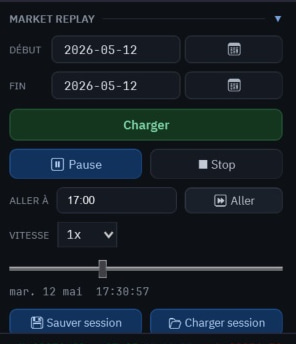
Pick a date, load, press play. The book replays the session at thirty frames per second, with the depth on both sides and the trades in the order they happened. You can pause, jump to a given time, and place your own orders in it: the measurements recompute on the real book data, not on a reconstruction.
A session saves to a file and reloads as it was, on the same machine or on another one.
Across the 1 513 listings of the NinjaTrader Ecosystem directory, a search on replay finds two, and neither of them is about the order book.
What the tool does not do
- It produces no signal, no arrow, no recommendation to enter or to exit. The measurements describe the state of the book; they do not comment on it and they conclude nothing.
- It does not replace a method. You need one already: the tool is there to check it against your own sessions, not to supply it.
- The risk guard closes positions and blocks order entry from the book. It does not stop you from trading: an order sent by another route escapes it, and no add-on can close a door the platform leaves open elsewhere.
What this adds to a book you already have
NinjaTrader 8 ships an order book, and its ecosystem holds dozens more. Three things are added here, and all three are about what is left AFTER the session.
- The recording
- One row per event, with the state of every measurement at the moment the order is placed — not at the moment it fills.
- Order book replay
- The session reloads and replays at thirty frames per second, with the depth on both sides. You place your own orders in it.
- The journal
- Over a hundred columns per event, in a format the analysis scripts read back. It is your own sessions that answer, not a setting brought in from outside.
What comes next
Release plannedQ4 2026
Development is told as it goes: what is measured, what is kept, and what was dropped after measuring. The tool sheet carries the full inventory, the requirements and the licence terms.
The release-notification form is waiting on two things: a sending provider and a privacy page that covers it.